Maintenance on industrial machinery carries serious risks. One misstep—like restarting a conveyor belt too soon—can result in severe injury or worse. That’s why lockout tagout (LOTO) procedures exist. Central to those procedures? The lockout tagout sign out sheet. It’s more than a form—it’s a documented trail of accountability that ensures every worker knows which machines are secured, who locked them out, and when it’s safe to resume operations.
This article breaks down everything you need to know about the lockout tagout sign out sheet: its function, essential components, integration into LOTO workflows, common pitfalls, and practical examples that reflect real-world use.
Why the Lockout Tagout Sign Out Sheet Matters
A lockout tagout sign out sheet is a written or digital log used during energy control procedures. Unlike individual lockout tags—which are physically attached to energy isolation devices—the sign out sheet is a centralized record. It tracks who initiated the lockout, which equipment is affected, when the lock was applied, and when it’s officially removed.
Its primary value lies in clarity and coordination. In environments with multiple maintenance teams, overlapping shifts, or complex machinery, verbal communication isn’t enough. A missing tag, an unmarked valve, or a misunderstood status can lead to accidental energization.
For example, imagine a chemical processing facility where three technicians are servicing a reactor. One removes a lock early, assuming work is done. Without a sign out sheet confirming all workers have cleared the area, the system could be re-energized while someone is still inside. The sign out sheet prevents this by requiring each technician to sign out before the system is restored.
OSHA standard 29 CFR 1910.147 emphasizes written procedures and employee involvement. While the regulation doesn’t explicitly mandate a “sign out sheet,” it does require a method to verify that all employees are aware of and involved in the lockout process—making the sign out sheet a de facto necessity for compliance.
Key Components of an Effective Sign Out Sheet
A useful lockout tagout sign out sheet isn’t just a blank form with lines. It must include specific fields that support clarity, traceability, and safety. Here are the critical elements:
- Equipment ID or Name – Clearly identify the machine or system being locked out (e.g., “#3 Packaging Line Motor”).
- Date and Time of Lock Application – When the lockout began.
- Authorized Employee Name and Signature – Each worker applying a lock must sign in.
- Location of Locks Applied – Specific points (valves, breakers, etc.) where locks are placed.
- Nature of Work – Brief description of the maintenance task.
- Time and Signature for Removal – Each worker must sign out when their work is complete and they’ve removed their personal lock.
- Final Clearance Verification – A supervisor or lead technician confirms all personnel are clear and all locks are removed.
Some organizations add QR codes, digital timestamps, or integration with CMMS (Computerized Maintenance Management Systems) for enhanced tracking. But even a paper-based version, when used correctly, dramatically improves safety.

Pro Tip: Use a clipboard mounted near the equipment zone. This keeps the sign out sheet visible and prevents it from being misplaced during a shift change.
How the Sign Out Sheet Fits Into the Full LOTO Process
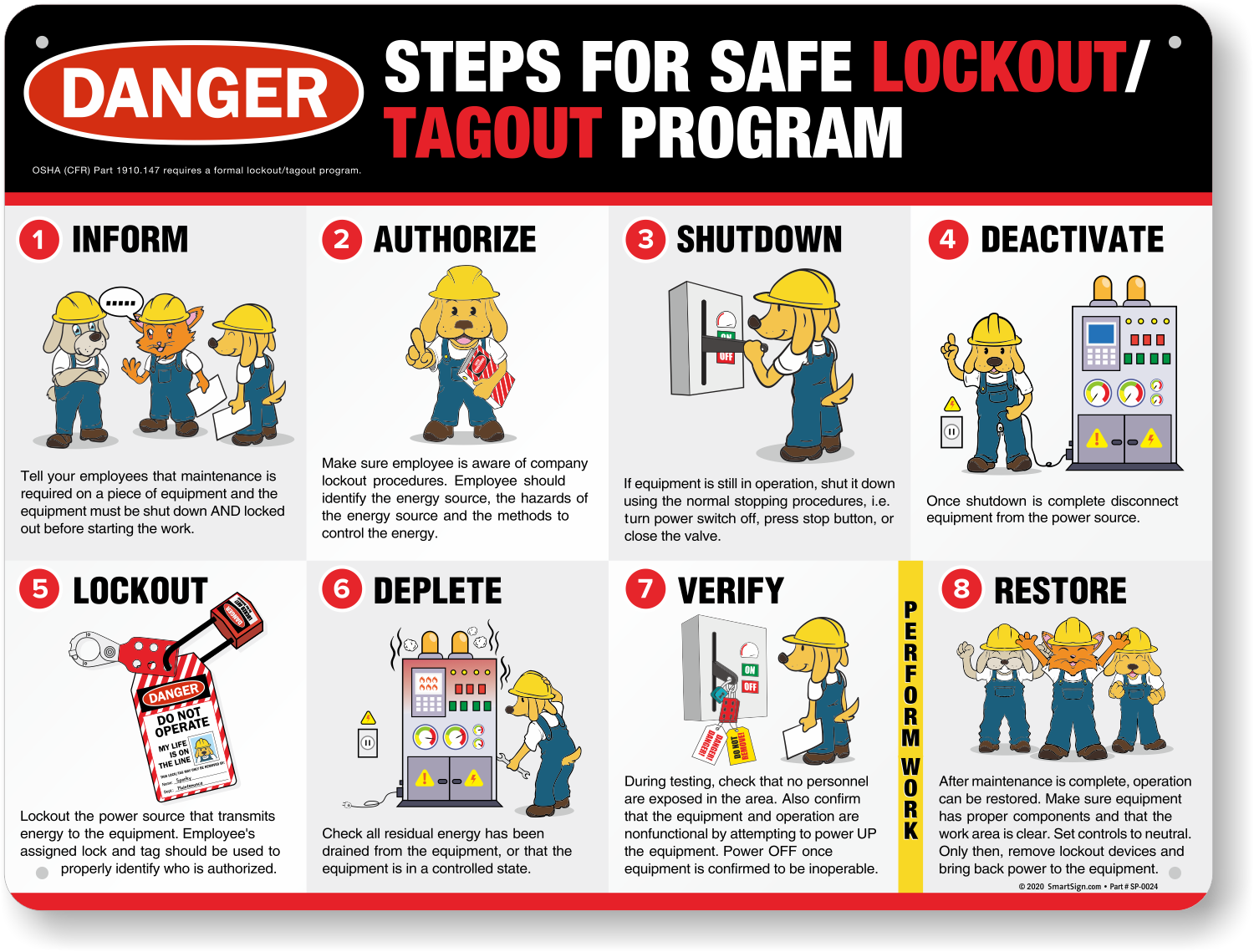
The sign out sheet doesn’t operate in isolation. It’s a key node in a broader lockout tagout workflow. Here’s how it fits:
- Preparation – Authorized employee identifies energy sources and prepares locks, tags, and the sign out sheet.
- Notification – All affected personnel are informed that a shutdown is imminent.
- Shutdown – Machine is turned off using normal controls.
- Isolation – Energy-isolating devices (breakers, valves) are physically locked.
- Application of Locks and Tags – Each employee applies their personal lock and fills out the sign in section of the sheet.
- Release of Stored Energy – Springs, hydraulics, capacitors, etc., are bled or blocked.
- Verification – Attempt to start the machine (with safeguards in place) to confirm zero energy.
- Maintenance Work – Repairs or servicing takes place.
- Sign Out – When finished, each employee returns, removes their lock, and signs out on the sheet.
- Final Clearance – Lead verifies all locks are removed, signs off, and re-energizes the system.
The sign out sheet acts as a real-time audit trail during steps 5, 9, and 10. It answers the critical question: Has everyone cleared the equipment?
In one documented incident at a Midwest manufacturing plant, a worker suffered a hand injury when a press was accidentally restarted. Investigation revealed that while four of five technicians had signed out, the fifth had gone on break and left his lock on. The sign out sheet was present but not properly monitored. The takeaway? Having the sheet isn’t enough—enforcing its use is what saves lives.
Common Mistakes and How to Avoid Them
Even experienced teams make errors with sign out sheets. Recognizing these pitfalls is half the battle:
| Mistake | Risk | Solution |
|---|---|---|
| Incomplete sign-in/sign-out | A worker’s lock remains, but their status is unclear | Require wet signatures or digital confirmation for each action |
| Lost or damaged sheet | No record of lockout status | Use weather-resistant, clip-mounted forms or digital apps |
| One person signing for others | Undermines personal accountability | Enforce one signature per employee, no exceptions |
| Not updating during shift changes | New crews unaware of active lockouts | Conduct handover briefings with the sheet as reference |
| Using generic labels | Ambiguity about which machine is locked | Include equipment IDs, photos, or diagrams on the sheet |
Another frequent issue: using the same sign out sheet for multiple machines. This creates confusion and delays. Each piece of equipment should have its own dedicated sheet during active maintenance.
Real-World Example: At a pulp mill, a technician servicing a roller failed to sign out after finishing his work. Two hours later, another team started up the line, not realizing a lock was still active. The resulting mechanical strain damaged the drive system. Reviewing the sign out sheet revealed the omission—prompting the facility to implement mandatory sign-out verification meetings.
Paper vs. Digital Sign Out Systems
While paper-based sign out sheets are common, digital alternatives are gaining traction—especially in facilities using smart maintenance platforms.

Paper Systems: - ✅ Low cost, easy to implement - ✅ No training or tech required - ❌ Prone to damage, loss, or illegibility - ❌ Hard to audit or search historically
Digital Systems: - ✅ Real-time updates and alerts - ✅ Integration with access control or CMMS - ✅ Tamper-proof logs and automated reminders - ❌ Requires devices, software, and user training
Some companies use hybrid models: a QR code on the equipment links to a cloud-based sign out form accessible via smartphone. Workers scan the code, log their status, and the system updates in real time. Supervisors get notifications when all sign outs are complete.
Digital doesn’t always mean better—but it can close gaps in high-turnover or multi-site environments.
5 Practical Use Cases for Lockout Tagout Sign Out Sheets
- Scheduled Maintenance on a Production Line
- A bottling plant shuts down its filler machine weekly. The sign out sheet ensures that all three maintenance techs sign in before work begins and sign out once complete. The shift supervisor checks the sheet before authorizing restart.
- Emergency Repairs on a Conveyor System
- A jammed conveyor stops operations. Technicians respond quickly but must coordinate with operators. The sign out sheet is posted visibly so no one attempts to restart the line during repairs.
- Contractor Work in a Chemical Plant
- Outside contractors service a reactor. The facility requires all contractors to sign in on the LOTO sign out sheet, ensuring they’re included in the clearance process—even though they’re not permanent staff.
- Multi-Shift Lockout Scenarios
- A night-shift technician locks out a saw for blade replacement. The morning crew verifies the sign out sheet before attempting any work, preventing accidental energization.
- Complex Equipment with Multiple Energy Sources
- A CNC machine has electrical, hydraulic, and pneumatic inputs. The sign out sheet lists each isolation point and which technician locked it—preventing oversight during verification.
Designing Your Own Lockout Tagout Sign Out Sheet
You don’t need a complex template. A well-designed form balances simplicity with completeness. Here’s a recommended layout:
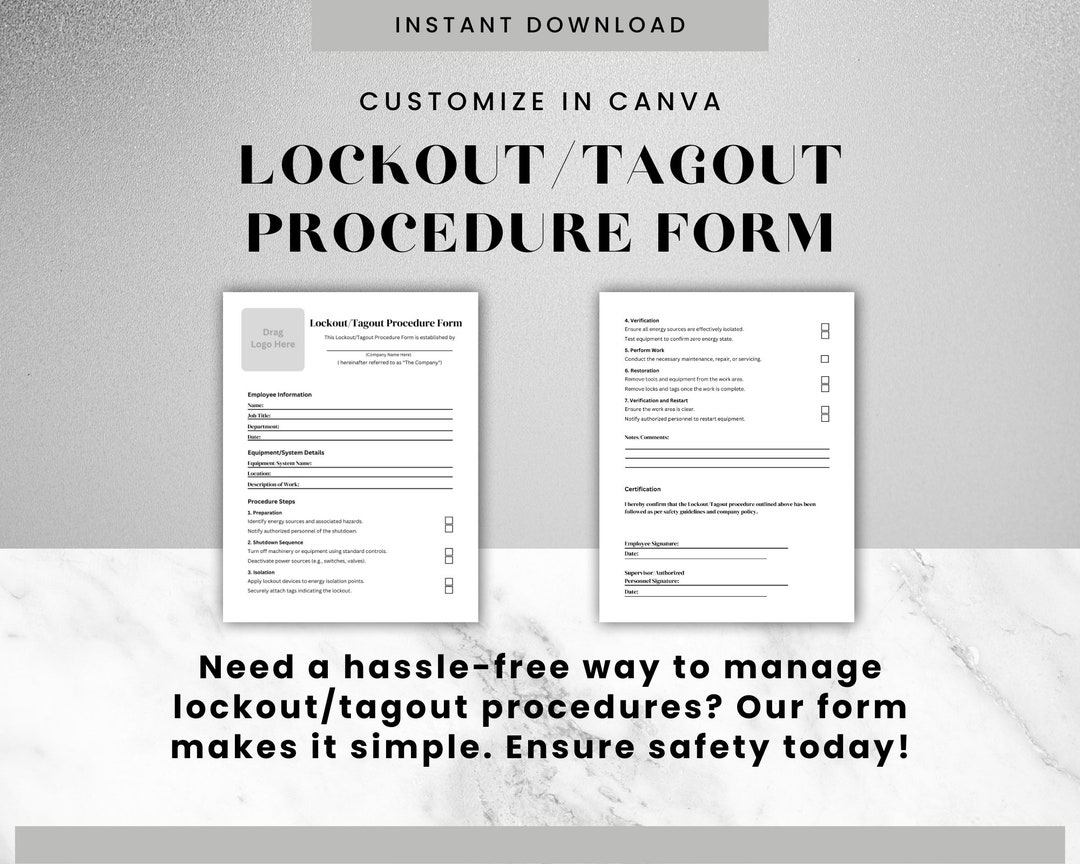
LOCKOUT TAGOUT SIGN OUT SHEET
Equipment: ________________________ ID: __________ Location: _________________________ Date: ________
| Employee Name | Lock ID | Sign In (Time/Initials) | Work Performed | Sign Out (Time/Initials) |
|---|---|---|---|---|
Final Clearance Verified By: _______________ Time: _______ Signature: _________
Print it on bright yellow or red paper for visibility. Laminate it or place it in a protective sleeve if used in wet or dirty environments.
Workflow Tip: Pair the sign out sheet with a LOTO board—a physical or digital display showing all active lockouts in the facility. This gives a big-picture view of safety status across departments.
Final Thoughts: Make the Sign Out Sheet a Living Document
A lockout tagout sign out sheet is only as effective as the culture behind it. The best form in the world won’t prevent accidents if workers skip signing out, or if supervisors don’t verify completion.
Treat it as a non-negotiable step—like wearing a hard hat or checking a blind spot. Train new hires on its use from day one. Audit its usage quarterly. Celebrate compliance, not just productivity.
In high-risk environments, the sign out sheet isn’t bureaucracy. It’s the line between a routine repair and a life-altering incident.
Implement it. Enforce it. Never bypass it.
Frequently Asked Questions
What is a lockout tagout sign out sheet? It’s a documented log that tracks which employees have applied and removed locks during equipment maintenance, ensuring all personnel are accounted for before re-energizing machinery.
Who should sign the LOTO sign out sheet? Every authorized employee who applies a lock must sign in when starting work and sign out when removing their lock.
Can a digital system replace a paper sign out sheet? Yes, if it provides equivalent accountability, traceability, and real-time access for all involved personnel.
Is a sign out sheet required by OSHA? OSHA doesn’t specifically mandate a “sign out sheet,” but its lockout tagout standard requires verification that all employees are protected—making such a sheet a practical necessity.
What happens if someone forgets to sign out? The equipment should not be re-energized. The team must verify the status of every lock and contact the employee if necessary.
Can one person sign out for a team? No. Each worker must personally sign out to confirm they’ve cleared the equipment and removed their lock.
How long should completed sign out sheets be kept? Best practice is to retain them for at least one year for audit and incident investigation purposes.
FAQ
What should you look for in Lockout Tagout Sign Out Sheet: What You Need to Know? Focus on relevance, practical value, and how well the solution matches real user intent.
Is Lockout Tagout Sign Out Sheet: What
You Need to Know suitable for beginners? That depends on the workflow, but a clear step-by-step approach usually makes it easier to start.
How do you compare options around Lockout Tagout Sign Out Sheet: What You Need to Know? Compare features, trust signals, limitations, pricing, and ease of implementation.
What mistakes should you avoid? Avoid generic choices, weak validation, and decisions based only on marketing claims.
What is the next best step? Shortlist the most relevant options, validate them quickly, and refine from real-world results.